WordPress is a wonderful CMS (Content Management System). With the large number of plugins and templates available you can build just about any site you can imagine. This flexibility makes WordPress one of the best website development programs available.
One down side to the flexibility is security. Many hackers target WordPress so when you’re planning an installation, it’s important to consider security, first. One ISP (Internet Service Provider) to check out is Turnkey Internet, which boasts bulletproof hosting. The service is more expensive, but if security is important to you, they’re worth checking out.
In addition, you should take further steps to secure your WordPress installation. Here’s what you can do:
- When setting up access to your blog, ask your ISP to enable SFTP (Secure File Transfer Protocol). As for software, there are many programs available. The one I use is WinSCP.
- Update your passwords regularly and make sure you use strong passwords. I also recommend using a minimum of 16 characters.
- When setting up your WordPress blog, use strong passwords. Never use the default “admin.” If you have, it can be changed after the fact in the database.
- Keep your blog updated with the latest version of WordPress.
- Make regular backups of your database (once a week is good). The plugin I use is WordPress Database Backup. Another option is to use cPanel and the Backups tools to download your database.
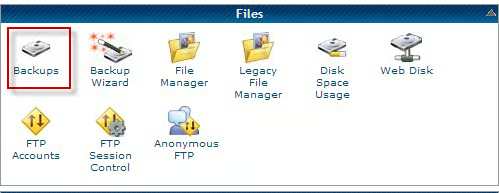
To do so, log into cPanel and scroll to the Files section and click on the Backups icon.
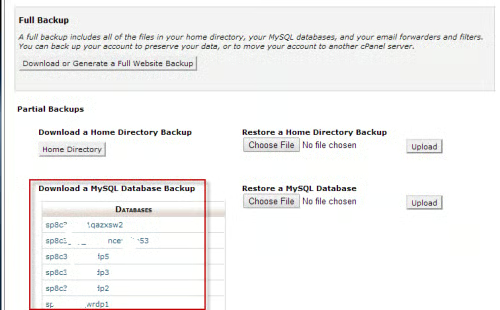
In the highlighted section above, click on a database to download it.
- One useful plugin to prevent hackers from breaking into your site is Limit Login Attempts. Here’s why you need it: “By default WordPress allows unlimited login attempts either through the login page or by sending special cookies. This allows passwords (or hashes) to be brute-force cracked with relative ease.”
- “Limit Login Attempts blocks an Internet address from making further attempts after a specified limit on retries is reached, making a brute-force attack difficult or impossible.”
Comment Spam Issues
Each WordPress installation comes with Akisimet to deal with comment spam, but if you’re being inundated with spam, Akisimet may not be enough. One solution is: WP Spam Free. (It’s no longer supported but it’s extremely effective in catching comment spam).
Analytics
One of the aspects of making your blog popular is promotion. If you know the keywords that visitors are using you can use these in your articles. One such plug-in is the Google Analyticator This plug-in adds JavaScript code necessary to enable Google Analytics. After you enable this plug-in, go to the settings page, input your Google Analytics UID, then click on authenticate your Google Analytics account.
Miscellaneous Plugins
The do follow plugin allows you to remove the no follow attribute from your comments.